AI Slop is Killing Educational Videos, Designed in California, Upcoming Movie Shortcut
Welcome to Top 5 Tech, my weekly show about what to watch,
listen to, read, download, and something deep every week.
On what to watch, we all know AI Slop on the internet
is a huge problem, and there's a new video
from the Fern YouTube channel about how AI Slop
and its content is actually really killing
educational content, especially on YouTube.
So many mimic and copycat channels, copycat videos,
that will take videos from legitimate educational channels
and remake it with AI Slop, and these AI Slop channels
We'll have millions of subscribers.
Millions of views, and it's becoming a serious problem.
So it's about a 30-minute video, but if you want to know what's really happening with
all the AI content, how it's affecting real creators on YouTube, especially the large
team educational channels that have been around for years, I highly recommend this watch,
The Death of Educational Content on YouTube.
On what to listen to, the Design in California podcast is out.
It's hosted by Mike Hurley and Jason Snell.
This was originally a Kickstarter, but the podcast is out now for everyone.
In California, I listened to the
Origin of Apple episode. Absolutely loved it. Really hearing the background history of Steve Jobs, Steve Wozniak,
how Apple got started, learned things I had never heard of before. It was a really fun listen.
There's also a video version on YouTube and there's already multiple parts of the podcast that are out. The Road to Apple is out there and
Apple's Mac OS crisis with special guest John Siracusa is also available to listen to. Highly recommend Design in California.
Link's below and if you're watching an Apple podcast
you'll see the little timed links pop up as I talk about different stuff.
I often mention Decoder, but this episode with New York Governor Kathy Hochul was incredible.
Nilay and Kathy talk about AI, how the governor is using it in her office to great effect,
how she's actually saved millions of man hours and millions of dollars using AI to optimize
certain aspects of how the state government is run.
But also the issues of AI in schools, how she's handling data centers and build out
in New York State and other states.
Really fascinating.
Absolutely love this episode.
I'm originally from New York, and I grew up--
So New York has a special place in my heart.
But this episode was really great.
I want to read--
I'm a little biased, but I actually
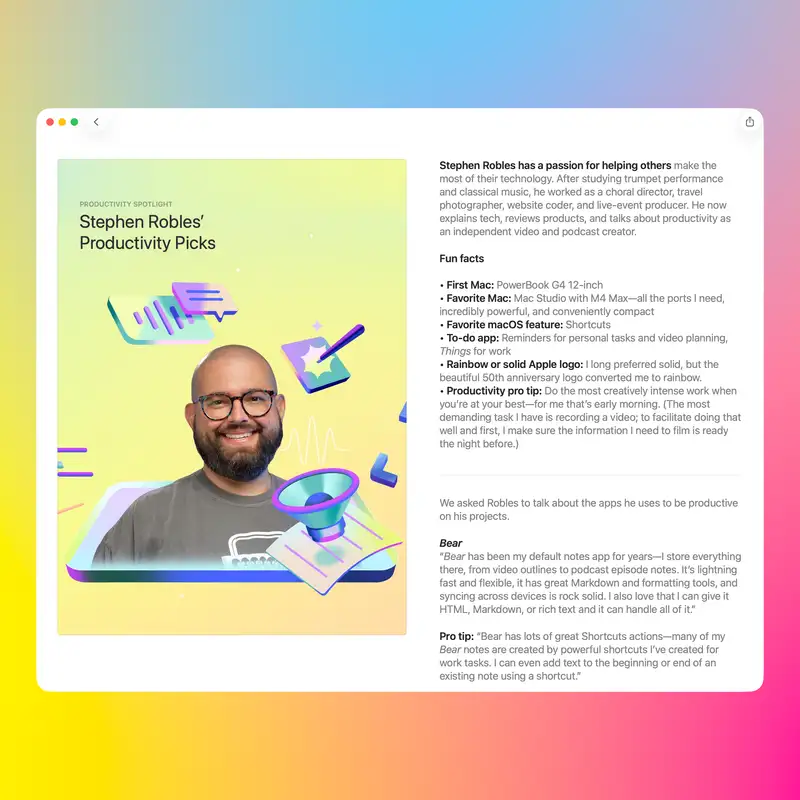
got a featured spotlight in the App Store this week.
This happened several months ago.
Apple reached out, wanted to know about some of the apps
that I use in my productivity workflows and content creation.
And it was in great company-- me, Jason Snell,
Christina Warren, and Quinn Nelson of the Snazzy Labs
YouTube channel.
We all got our own write-ups this week, Monday
through Thursday.
So I'll link mine.
You can learn about some of the apps
that I use, which you might have heard about many of them
before, but maybe some.
are new, and you can go over to Christina's, Quinn's, and Jason Snell's articles also.
They have some great app picks, apps I've never heard of that are really useful.
So links to each of our highlights will be down in the show notes.
On what to download, I'm going to give you a shortcut that I was really excited to build,
and one that I keep tweaking is my movie database shortcut.
I've had shortcuts that find upcoming movies, let you search, even identify movies,
but I wanted to filter just popular movies coming out in theaters that's either now or coming soon,
and be able to add those.
I'm going to put a link that actually adds these movies to the Can-Do app,
and if you're watching this podcast, I'm going to show you how it works right now.
But the shortcut itself, once you download the shortcut,
it asks for your current location because it's going to adjust results based on
if you're in the United Kingdom, Canada, Australia, or the United States,
and it does it automatically.
But if you scroll to the very bottom of this shortcut,
there's actually an Add to Can-Do action,
but you can swap this out for Reminders, for Apple Notes,
whatever app you want to put these movies into.
Just swap out this last action for your
and then the shortcut can work for anyone.
But when you run this shortcut,
and you can see Can Do right here in the background,
I have a watch list column in my movies project.
So when you run this shortcut,
it's gonna ask for your location
'cause it's gonna customize results
based on United States, Canada, UK, or Australia.
Allow, it's gonna ping the movie database,
and then you're gonna see a list of upcoming movies
ranked in popularity.
Let's say I wanna add "LEGO Star Wars"
and "Practical Magic 2."
You can choose multiple movies, as many as you would like.
And then, once you hit...
done, hit "Allow" again.
You only have to do this "Allow" the first time you run it.
You'll see those two were just added to the CanDo app
with the movie poster connected to the task.
The release date is actually set as the task due date.
There's an overview already in the task note for the movie.
And if it's in theaters,
a movie database is going to try and pull whether or not
there's a post-credit scene.
And if you check the links,
there's even a link to the trailer
so you can watch that if you want.
All in the task, all from that one shortcut.
Again, you can either go to Reminders.
or your app of choice, but the version that I link below is going to be working with CanDo specifically,
and linked to CanDo, my productivity app, is down below as well.
And lastly, on something deep, I recently published this video on my YouTube channel
about how I use iPad every day, and I do.
I actually used iPad to edit the Primary Tech podcast earlier today.
I use it to work on shortcuts.
I will remote into my Mac, which then people were like,
"Well, if you have to remote into your Mac, well, the iPad is not a good productivity device,
and you shouldn't try to use it."
A lot of people in the comments also said.
iPad as my main device and I can never make it work. So I just wanted to say
when you think about productivity and what tools you're going to use to get
your work done, use the tool best suited for your work. I love my Mac Studio and I
use it for a majority of my work. Editing this podcast in the video and I run it
through Gling, my app that I run every video through. I need the Mac for all of
that and the Mac works great for it. I love Final Cut. I don't want to edit
videos on iPad. But that doesn't mean the iPad is a bad device or one that is not
productive. I love building shortcuts on the iPad.
I like being able to edit audio podcasts on iPad, and I've been doing that for almost 10 years now, and I prefer to edit audio in Faraday on the iPad versus any other app that I have on my Mac.
So for some people, the iPad can be a great tool, even a professional tool, but just because it doesn't fit into your workflow doesn't mean you have to, nor does it mean the iPad is a bad device.
Now, I do wish in iPadOS that the Safari browser would be more like Safari on the Mac. That's actually desktop class.
It has all the features, can load all the websites properly, so I do wish Safari on the iPad was better, but it is a different product in a different form factor for different uses.
Photographers who take it out in the field and maybe love the nanotexture screen, 13 inches, being able to import photos from an SD card directly into the Thunderbolt port on the iPad, that's a very niche and specific use case, albeit professional.
But bottom line, use the tool that suits you and suits how you like to work and helps you get the work done.
Efficiently, and maybe even in an enjoyable way, like I enjoy using my iPad on the patio and I'm building shortcuts for the community.
So that's just something deep. Check out my YouTube video that's down in the show notes along with links to everything I talked about, and you can get this as a newsletter every week, scan this QR code.
I send the email out every Friday with all the links that I talk about here in the podcast with a little more commentary as well.
If you haven't yet, I'd greatly appreciate a five-star rating and review an Apple podcast for this show, Top 5 Tech, and thank you for listening and watching. I'll catch you next time.